
Download PKZIP – Free File Compression Software for Windows, Mac, Android & iOS
PKZIP is a powerful and reliable file compression software that helps users shrink files to save disk space and improve transfer speeds. Originally developed by Phil Katz and PKWARE, Inc., PKZIP introduced the widely used ZIP file format back in 1989. Today, it remains a trusted standard for data archiving and lossless compression, capable of reducing file sizes by up to 95%.
Whether you're a student, professional, or casual user, PKZIP offers secure compression, strong encryption, and support for multiple archive formats including ZIP, TAR, BZ2, GZ, JAR, and more. With cross-platform compatibility across Windows, Mac, Android, and iOS, it ensures seamless file sharing and management. The intuitive interface makes it easy to add, extract, encrypt, and share archives with just a few clicks.
While the full version requires a subscription, a 30-day trial is available for testing its full capabilities. Download PKZIP today and streamline your digital workflow with one of the most enduring file compression tools in history.
Powerful Compression & Secure File Management
One of the standout features of PKZIP is its ability to compress files with exceptional efficiency. By reducing file sizes by up to 95%, users can free up valuable disk space on their devices—especially important for those managing large media libraries, software installations, or backup archives. Unlike many modern compression tools, PKZIP supports the original ZIP format that remains the gold standard for cross-platform compatibility. Whether you're compressing documents, photos, videos, or entire project folders, PKZIP maintains data integrity through lossless compression, ensuring no information is lost during the process.
Security is another major strength. PKZIP provides robust password protection and supports advanced encryption standards, including AES-256, to safeguard sensitive files during transfers or storage. This is particularly valuable for professionals handling confidential business data, legal documents, or personal information. The software allows users to set strong passwords and even embed digital signatures for authenticity verification. Additionally, PKZIP’s command-line interface offers automation capabilities for advanced users who need to integrate compression tasks into scripts or batch processes.
With the ability to handle archives containing over 2 billion files and support for file sizes exceeding 9 exabytes, PKZIP is built for enterprise-level tasks. This scalability makes it ideal for IT departments, data analysts, and developers working with massive datasets. The software also supports a wide range of archive formats beyond ZIP, including TAR, BZ2, GZ, UUE, XXE, and JAR, allowing seamless extraction and conversion. Whether you're extracting a compressed file from a colleague or preparing a project for cloud upload, PKZIP delivers consistent, reliable performance across all file types.
Easy-to-Use Interface & Cross-Platform Compatibility
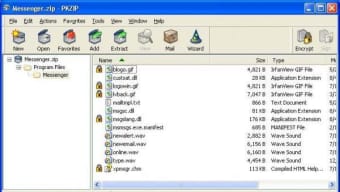
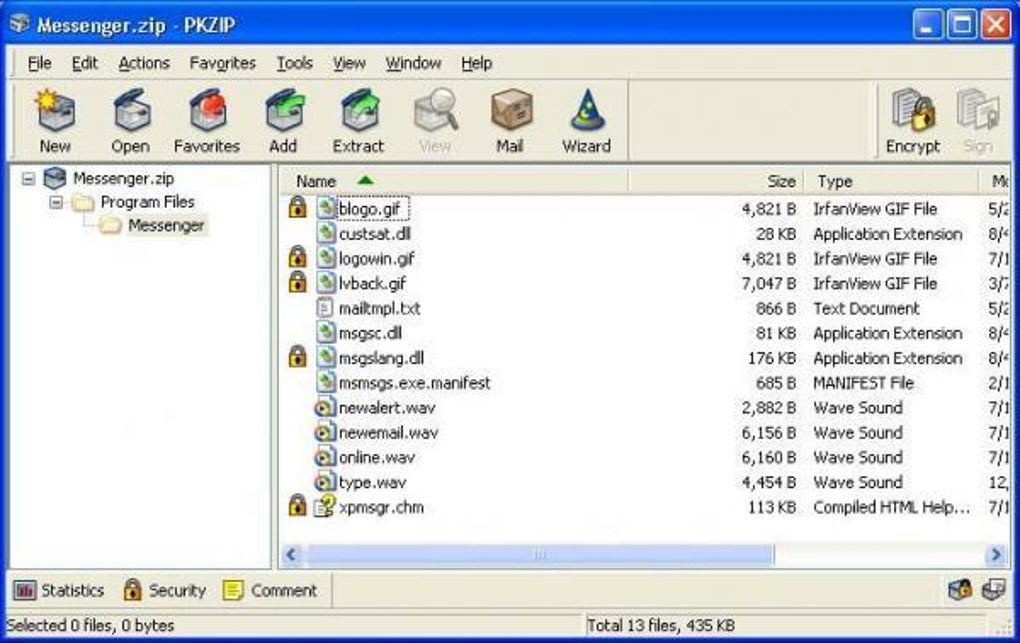
PKZIP’s user interface is designed with simplicity in mind, making it accessible to users of all skill levels. The main window features a clean layout with two primary panels: a navigation pane on the left and a file list on the right. The top ribbon bar includes essential tabs like Home, Tools, and Settings, each housing intuitive buttons for core functions. The Home tab includes quick access to Add Files, Extract Files, Encrypt, Sign, View, and Email Archive—enabling users to perform common tasks with just one click.
For beginners, the drag-and-drop functionality simplifies the process of adding files to an archive. Simply drag your desired files into the PKZIP window, choose a compression level, and click "Create." Extracting files is equally straightforward—just select the archive, choose the destination folder, and click "Extract." The software also includes a built-in preview feature, allowing you to view the contents of an archive before extracting, which helps prevent accidental data loss.
One of PKZIP’s greatest advantages is its cross-platform support. It runs smoothly on Windows, Mac, Android, and iOS devices, ensuring consistent performance whether you're working on a desktop, laptop, tablet, or smartphone. This compatibility is crucial for teams collaborating across different devices or individuals managing files across multiple platforms. Whether you're sending a compressed folder via email, uploading to cloud storage, or transferring files via USB, PKZIP ensures seamless interoperability. The mobile apps are especially useful for on-the-go users who need to compress or extract files while traveling or working remotely.
Pros, Cons & Key Features at a Glance
- High compression ratio – Reduces file sizes by up to 95% without data loss.
- Strong encryption – Supports AES-256 and password protection for secure file sharing.
- Multi-format support – Handles ZIP, TAR, BZ2, GZ, JAR, UUE, XXE, and more.
- Cross-platform compatibility – Available for Windows, Mac, Android, and iOS.
- Command-line interface – Enables automation and scripting for advanced users.
- Large archive support – Can manage archives with over 2 billion files and 9 exabytes in size.
- Intuitive UI – Easy drag-and-drop and one-click operations for beginners.
Pros
- Industry-standard ZIP format support
- Excellent data security with encryption and digital signing
- Highly scalable for large-scale file management
- Consistent performance across all platforms
- Reliable and stable with minimal crashes
Cons
- 30-day trial requires personal information to download
- No fully free version—only a limited trial
- Lacks some modern features found in competitors (e.g., cloud integration)
- Can be slow with very large file batches
- Subscription-based pricing may deter casual users
Frequently Asked Questions (FAQ)
How do I open a PKZIP file?
To open a PKZIP file, simply double-click it if PKZIP is installed on your system. Alternatively, right-click the file and select "Open with" > "PKZIP." The software will display the archive contents, allowing you to extract files individually or all at once. If you don’t have PKZIP, you can use other ZIP-compatible tools like WinRAR, 7-Zip, or built-in utilities on Windows and Mac.
Is PKZIP free to download?
PKZIP offers a 30-day free trial, but the full version requires a subscription. The trial version is available for download after filling out a form with personal details. While it’s not fully free, the trial allows you to test all features before purchasing.
Can I use PKZIP on Android and iOS?
Yes, PKZIP is available as a mobile app for both Android and iOS devices. These apps allow you to compress, extract, and manage ZIP files directly from your smartphone or tablet, making it convenient for remote file handling.
Does PKZIP support large files and archives?
Absolutely. PKZIP can handle archives with over 2 billion files and file sizes exceeding 9 exabytes, making it suitable for enterprise-level data management and long-term backups.
What encryption does PKZIP use?
PKZIP uses AES-256 encryption, one of the strongest available, to secure files. It also supports password protection and digital signatures for added security during file transfers.
Final Verdict: A Trusted Tool for Modern File Management
PKZIP remains a top-tier choice for anyone needing reliable file compression and secure data management. Despite its subscription model and limited free access, its performance, security, and cross-platform support make it a worthwhile investment for professionals, students, and power users alike. The software’s long-standing reputation—dating back to 1989—speaks volumes about its stability and effectiveness. Whether you're preparing a project for submission, backing up critical files, or sharing large datasets securely, PKZIP delivers consistent results.
If you’re looking for a software that combines proven technology with modern functionality, PKZIP is hard to beat. While it may lack some cutting-edge features found in free alternatives, its strength lies in reliability, encryption, and scalability. The 30-day trial gives you ample time to test its full potential. Don’t miss the chance to download PKZIP today and take control of your digital files with confidence.
Download PKZIP now and experience the legacy of file compression excellence—secure, efficient, and built to last.







